 Skip to content
Quick answer: how do I register on V3 Game?
Open the V3 Game register screen, enter your +91 mobile number, set a password and confirm it, keep the invite code, tick the Privacy Agreement and tap Register. It takes about two minutes and is free. You must be 18 or older.
Step by step
What are the V3 Game registration steps?
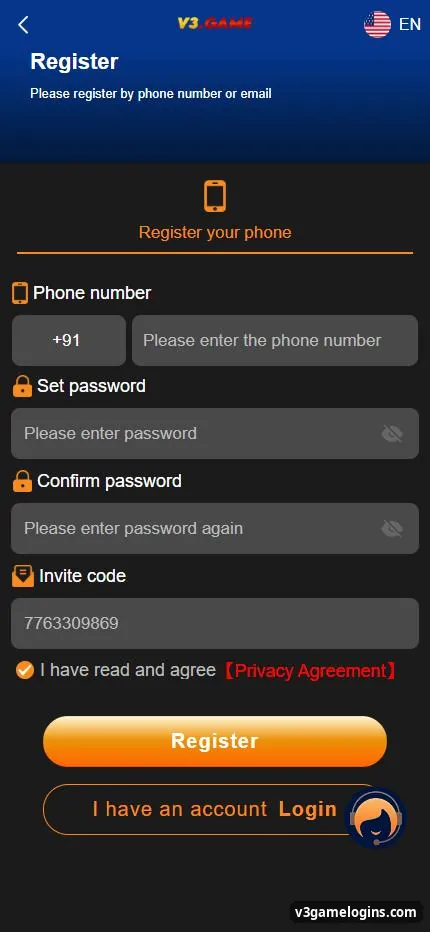
The register screen says “Please register by phone number or email” and has five fields: phone number, set password, confirm password, invite code and the agreement tick box.
- Open the register screen. Tap Register here; the invite code is filled in for you.
- Type your mobile number. +91 is preset. Enter the 10-digit number you use daily.
- Set password. At least 8 characters with upper-case, lower-case letters and numbers.
- Confirm password. Type the same password again.
- Check the invite code. Keep the code shown, or enter one a friend shared.
- Tick and register. Read the Privacy Agreement, tick “I have read and agree”, then tap Register.
Before you start
What do I need to create a V3 Game account?
You need to be 18+, have an Indian mobile number or email you can receive codes on, and a bank account or UPI ID in your own name for later withdrawals.
| Field | What to enter | Tip |
|---|---|---|
| Phone number | +91 and 10 digits | Use a SIM you keep; it is used for resets |
| Set password | 8+ characters, A–Z, a–z, 0–9 | Do not reuse a bank or email password |
| Confirm password | Same as above | Tap the eye icon to compare |
| Invite code | Pre-filled or from a friend | Links your account to the inviter |
| Privacy Agreement | Tick box | Open and read it before ticking |
Invite code
Do I need an invite code to register on V3 Game?
The invite code field is part of the sign-up form; the Register button on this site fills it in automatically, so you do not need to find one.
The code connects your account to whoever invited you in the platform’s Promotion (agent) system. Offers tied to invites are shown inside the app and change often. Learn how it works in the V3 Game invite code guide.
Next
What should I do after registering on V3 Game?
Secure the account first, then set a budget, and only then make a deposit.
- Bind your email in Account → Settings so you can reset the password either way.
- Add a UPI ID or bank card in your own name for withdrawals.
- Decide a limit for the day or week and stick to it.
- Read the rules of the game you want, such as Win Go.
- Make a small deposit using the deposit guide.
You can also go back to the v3game homepage guide for an overview.
Fixes
Why is my V3 Game registration not working?
Registration usually fails because the password does not meet the rules, the two passwords differ, the agreement box is unticked, or the number is already registered.
- Password rejected: add a capital letter, a small letter and a number; use 8+ characters.
- “Passwords do not match”: retype both fields carefully.
- Number already used: you may already have an account; go to V3 Game login and use Forgot password.
- Button does nothing: tick the Privacy Agreement box and check your connection.
FAQ
V3 Game register questions
Is V3 Game registration free?
Yes. Signing up costs nothing; money is only used if you choose to deposit.
Can I register on V3 Game with email?
The screen says you can register by phone number or email. Phone is the default; switch if the email option is shown.
Can I open two V3 Game accounts?
Use one account per person. Several accounts for the same person often break platform rules and can block withdrawals.
What are the V3 Game password rules?
The platform asks for upper- and lower-case letters and numbers, with at least 8 characters.
How old do I have to be?
You must be 18 or older, and real-money gaming must be allowed where you live.
Do I get a bonus for registering?
Offers change and are listed in the Promotion and activity pages inside the app. Read the terms first; see our bonus guide.
Key takeaways
- Register with +91 phone (or email), a strong password twice and the invite code.
- Tick the Privacy Agreement and tap Register.
- Bind email and add a payout account in your own name before depositing.
- Only adults 18+ may register.
