 Skip to content
Quick answer: how do I know I am on the real V3 Game site?
Use a link from a source you trust, check the full address in the browser bar before you type your password, and make sure the screens match the real V3 Game layout (V3.GAME logo, Login, Register, Deposit and Withdraw tiles). The platform address we tested for this guide is the one behind the Register and Log in buttons on this site. Never log in from a link or APK sent in a chat.
Step by step
How do I check a V3 Game link before logging in?
Five quick checks catch almost every fake page.
- Read the whole address. Look for extra letters, swapped letters or unusual endings.
- Look for the padlock. A missing or broken HTTPS padlock is a red flag.
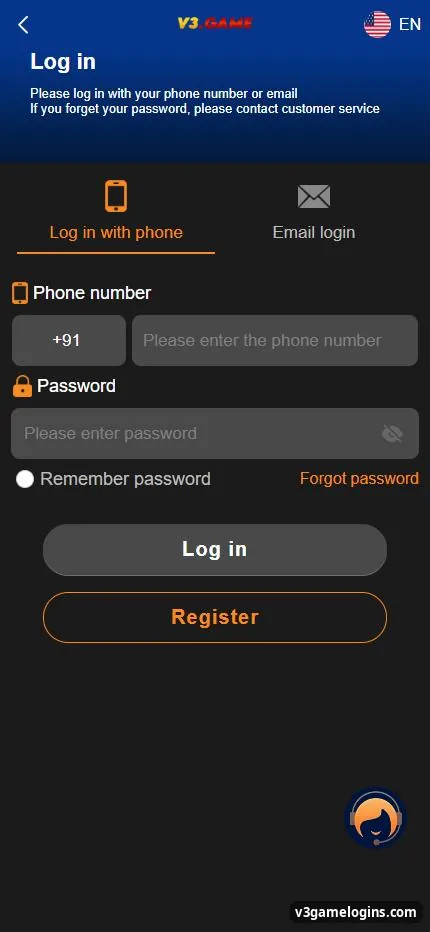
- Compare the screens. The real login has “Log in with phone” and “Email login” tabs, +91, Remember password and Forgot password.
- Bookmark it. Once checked, open it from your bookmark every time.
- Never pay outside the cashier. Real deposits happen only inside your account.
Compare
What do the real V3 Game screens look like?
Genuine V3 Game screens use a dark blue layout with orange buttons and the V3.GAME logo.
- Register: phone number, set password, confirm password, invite code, Privacy Agreement.
- Login: phone or email tab, password, Remember password, Forgot password.
- Home: Download App banner, Login, Register, Deposit, Withdraw tiles.
- Bottom bar: Home, Promotion, Wallet, Account.
Red flags
What are the signs of a fake V3 Game site or app?
| Red flag | Why it matters |
|---|---|
| Asks for UPI PIN or OTP | No real game site needs them; this empties accounts |
| Pay to a personal UPI ID | Money sent this way cannot be traced to your game wallet |
| “Prediction” or “hack” app | Results cannot be predicted; these steal money or logins |
| APK from WhatsApp or Telegram | May contain malware |
| Pressure: “offer ends in 5 minutes” | Rushing stops you checking details |
| Fee to “unlock” a withdrawal | A classic advance-fee scam |
Act fast
What should I do if I used a fake V3 Game site?
Change your password at once, contact your bank if you paid, and report the fraud.
- Change your password on the real platform and anywhere you reused it.
- Call your bank to block cards or UPI if you shared details.
- Report cyber fraud on the national helpline 1930 or cybercrime.gov.in.
- Uninstall any doubtful app and scan your phone.
For everything else, see the v3 game main guide.
About this site
Is v3gamelogins.com the V3 Game operator?
No. v3gamelogins.com is an independent guide; we do not run the platform, take bets or handle money.
We link to the platform address we tested and keep this page updated. Read more about us or our disclaimer.
FAQ
V3 Game link questions
Why are there so many V3 Game websites?
Information sites, affiliate pages and fake clones all use the name. Check the address and the screens before you log in.
Does V3 Game ever change its address?
Gaming platforms sometimes move addresses. Only trust a new address from inside your logged-in account or a source you already trust.
Will V3 Game support message me on WhatsApp?
Use the customer service inside the app. Treat unexpected messages as suspicious.
Is the V3 Game APK safe?
Download only from the Download banner inside the platform, never from files shared in chats.
What does the padlock mean?
It means the connection is encrypted. It does not prove the site is genuine, so check the address too.
How do I report a fake site?
Report cyber fraud on the 1930 helpline or cybercrime.gov.in, and tell us through our contact page.
Key takeaways
- Check the address and the screens before typing your password.
- Bookmark the link once you have checked it.
- Never share OTP or UPI PIN; never pay a personal UPI ID.
- If scammed: change password, call your bank, report on 1930.
