 Skip to content
Quick answer: how do I log in to V3 Game?
Open the V3 Game login screen, pick “Log in with phone” (+91 number) or “Email login”, type your password and tap Log in. If you forgot the password, tap Forgot password and reset it by phone or email with a verification code. No account yet? Register on V3 Game first.
Step by step
What are the V3 Game login steps?
V3 Game login uses the phone number or email and password you chose when you signed up; there is no separate username.
- Open the login screen. Tap Log in on this page; the platform opens in a new tab.
- Stay on “Log in with phone”. The +91 country code is already selected.
- Enter your mobile number. Type the 10-digit number you registered with.
- Enter your password. Tap the eye icon to check what you typed.
- Tap Log in. You arrive on the home screen with your balance and the game lobby.
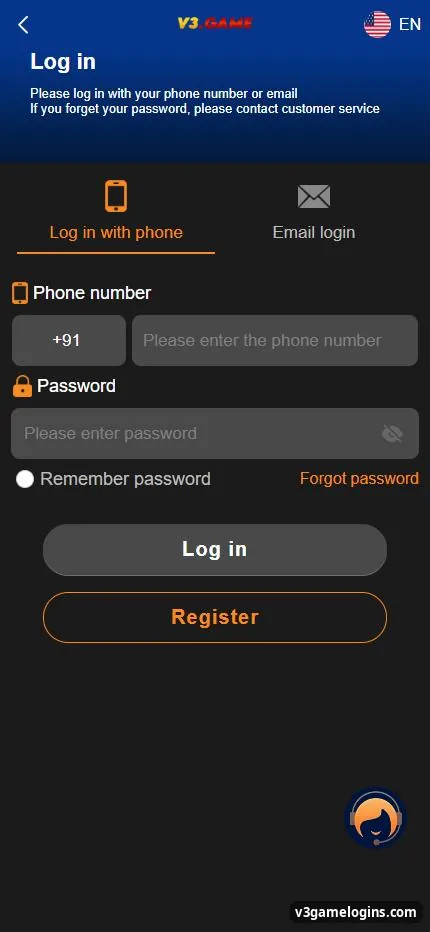
The screen itself says: “Please log in with your phone number or email. If you forget your password, please contact customer service.” Everything on this page follows that screen.
Other option
Can I log in to V3 Game with email?
Yes. Tap the “Email login” tab, type your registered email and password, and tap Log in.
Email login works if you registered with email or later bound an email in Account → Settings. If you only used a phone number, stay on the phone tab. The Remember password box keeps you signed in on that device; use it only on a phone that nobody else uses.
Recovery
How do I reset a forgotten V3 Game password?
Tap Forgot password, choose Phone reset or Email reset, set a new password twice, enter the verification code you receive and tap Reset.
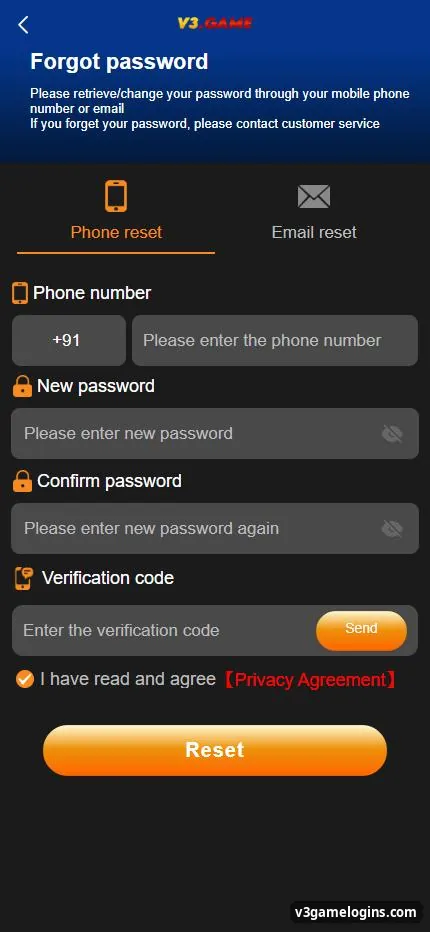
- Tap Forgot password. It is under the password box on the login screen.
- Choose a method. Phone reset for your +91 number, or Email reset.
- Type a new password twice. Use upper- and lower-case letters and numbers, 8+ characters.
- Get the code. Tap Send and enter the verification code you receive.
- Accept and reset. Tick the Privacy Agreement box and tap Reset, then log in again.
If no code arrives, wait a minute and tap Send again, check the number, or contact customer service from inside the app. Support will never ask for your UPI PIN or bank OTP.
Fixes
Why can’t I log in to V3 Game?
Most failed logins come from the wrong tab, a typing mistake, an old saved password, a fake copy of the site or a weak connection.
| Problem | Likely cause | What to do |
|---|---|---|
| “Wrong password” | Typo, caps, or old saved password | Tap the eye icon, retype, or reset the password |
| Account not found | Wrong tab or wrong number | Switch between phone and email tabs; check all 10 digits |
| Page does not load | Weak network or old cache | Switch Wi-Fi/mobile data, clear browser cache, retry |
| Looks different from usual | Possible cloned site | Close it and follow our real link check |
| Code never arrives | Network delay or wrong number | Wait, resend, or contact in-app customer service |
Security
How do I keep my V3 Game login secure?
Use a unique password, bind both phone and email, and turn on Google verification in Settings if you want an extra check.
- Never reuse your email or bank password.
- Do not log in from links sent in chats; type or bookmark the address.
- Log out on shared devices and untick Remember password.
- Change your password at once if you shared it with anyone.
After signing in, see how to add money with UPI or return to the v3 game login and register guide.
FAQ
V3 Game login questions
Is there a username for V3 Game login?
No. You log in with your registered phone number or email plus your password.
Can I use the same account in the app and the browser?
Yes. The app and the browser version share one account and one wallet.
What does “Remember password” do?
It saves your login details on that device so you do not need to type them next time. Use it only on your own phone.
Can I log in on two phones?
You can sign in on another device with the same details. If you notice logins you did not make, change your password straight away.
I changed my mobile number. How do I log in?
Try Email login if you bound an email. Otherwise contact customer service inside the app to update the number after verification.
Why does V3 Game ask for a verification code?
Codes are used for password resets and for binding a phone or email, to prove the number or address is yours.
Key takeaways
- Log in with phone (+91) or email and your password.
- Forgot password: Phone reset or Email reset with a verification code.
- Check the site address before you type your password.
- Bind phone and email so you can always recover access.
